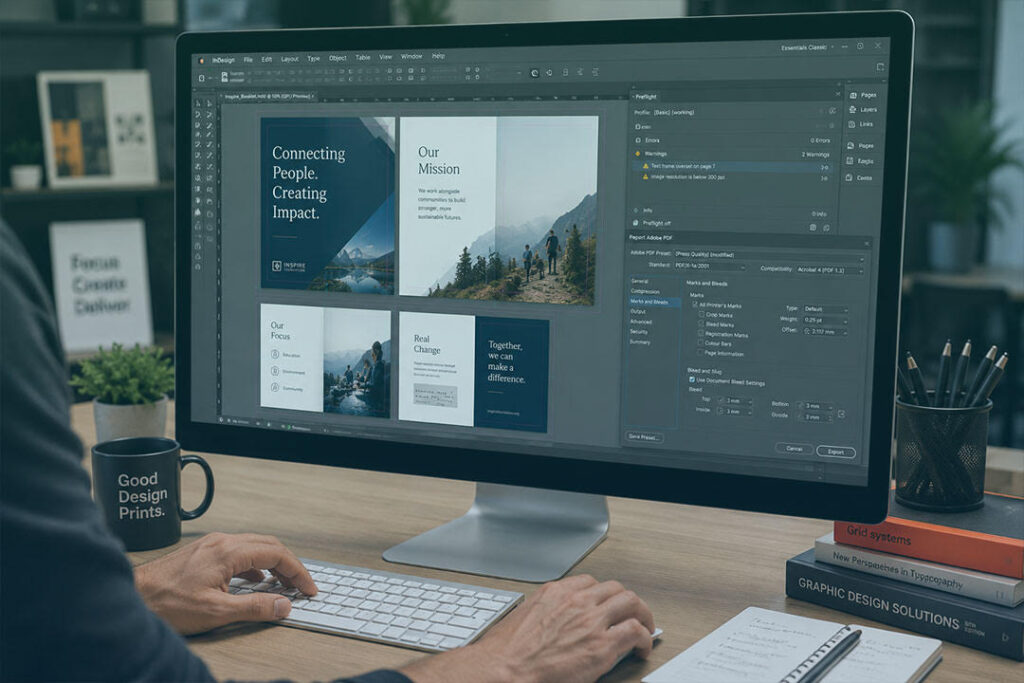
Most book printing problems start before the printer even touches the job.
A blurry logo. Margins too tight near the spine. A Word document that changes layout when opened on another computer. We see it constantly. Someone spends six months writing a book or building a training manual, then sends files through five minutes before the deadline and hopes everything works.
That gets expensive fast once you move into proper quantities.
Good book printing preparation is not complicated, but it does need attention. Especially if you are printing hundreds or thousands of copies. One mistake repeated across 5,000 books is no longer a small mistake.
If you are organising professional book printing, this is the stuff worth checking before anything goes to press.
Why Book Printing Preparation Matters More Than People Think
A printer can only print what you supply.
If the images are low resolution, they will print blurry. If the margins are wrong, text can disappear into the binding. If your colours are set up badly, your dark navy branding might suddenly print purple.
None of this is rare.
We have seen clients print thousands of catalogues only to notice tiny white trim lines around every page after delivery because bleed was missing from the file setup. At that point the books already exist. The paper is printed. The freight is booked. Nobody is fixing that cheaply.
This matters even more with bulk commercial work.
If you are printing 20 books for a local event, you might get away with a few issues. If you are printing 10,000 training manuals across Australia, every small problem gets multiplied thousands of times.
That is why proper book printing preparation matters before production starts, not after.
If you are planning a larger commercial run, this guide to commercial book printing for training manuals and corporate publications explains how production requirements change once quantities increase.
Send a Proper Print Ready PDF
PDF files are the standard for professional book printing.
Not Word files.
Not Canva share links.
Not screenshots pasted into emails.
A proper print ready PDF locks the layout into place so fonts, spacing, and images stay exactly where they should.
Before exporting your file, check:
- Fonts are embedded
- Images are high resolution
- Bleed is included
- Pages are exported in the correct order
- Colours are converted correctly for print
If any of that sounds unfamiliar, ask your printer before exporting the file. A five minute conversation early on usually saves hours later.
You can also review Mint’s support page if you need help preparing artwork before production.
Low Resolution Images Still Ruin Books
This catches people constantly because screens hide the problem.
An image pulled from Facebook or a website might look perfectly sharp on your monitor. Then it gets printed at full size and suddenly everything looks soft and pixelated.
For book printing in Australia, images should generally be 300 DPI at actual print size.
This matters a lot for:
- Product catalogues
- Training manuals
- Corporate reports
- Photography books
- Educational material
- Hardcover books
Logos are another common issue. People often paste tiny web versions into large layouts and assume the printer can somehow sharpen them later.
It does not work like that.
If the original artwork is poor, the printed result will usually be poor too.
If you are printing premium covers or collector style books, this article on hardbound book printing premium finishes that stand out covers some of the production details worth considering early.
Bleed and Margins Are Where a Lot of Jobs Go Wrong
This is one of the biggest file setup mistakes we see.
Bleed is the extra image area extending past the trim edge of the page. Usually around 3mm.
Without bleed, trimming can leave thin white edges around the pages once the books are cut down.
Then there are safe margins.
Safe margins stop text getting trimmed too close to the edge or disappearing into the spine area.
A 40 page saddle stitched booklet is fairly forgiving. A 300 page perfect bound book is not. The thicker the spine gets, the more room you need near the binding side.
We regularly see books where page numbers or paragraphs sit too close to the spine because the layout was built without considering how the finished book would physically behave once bound.
That is why printers ask about page count, paper stock, and binding method before quoting properly. Those details affect the file setup.
For a deeper breakdown of print quantities and production planning, read how many books should you print choosing the right print run.
RGB Colours Look Different Once Printed
Your screen uses RGB colour.
Printing uses CMYK.
That difference matters more than people realise.
Bright blues, greens, and neon colours that look great on screen often print flatter on paper if the file was never prepared properly for print.
A lot of clients only notice this once the proof arrives.
If brand colours matter, especially for franchises, corporate reports, or retail material, always ask for a printed proof before approving the full run.
It is a lot cheaper to fix colour problems before printing 8,000 copies.
Adobe’s official CMYK colour guide also explains how colour profiles affect printed output.
Font Problems Can Break a Layout
Fonts cause strange problems when files are not prepared correctly.
If fonts are missing or not embedded properly, the system may replace them automatically during production. Once that happens, spacing changes. Paragraphs move. Line breaks shift.
A 220 page book suddenly becomes 224 pages and now the spine width is wrong as well.
We have seen files where one missing font changed the entire layout across hundreds of pages.
That is why print ready PDFs matter so much.
If you are using unusual fonts or custom typography, double check everything before export.
Think About Binding Before You Finish the Layout
Binding changes how a book feels, opens, trims, and sits on a shelf.
It also changes how files need to be prepared.
Perfect bound books need different inner margins compared to spiral bound manuals. Hardcover books need spine calculations and cover wrap allowances. Saddle stitched booklets behave differently again.
This is where talking to your printer early helps.
Sometimes clients design a book first, then realise later the binding method they chose does not suit the page count or budget. Other times a small layout adjustment saves thousands across a large commercial run.
That is normal.
Your printer should be warning you about this stuff before the job gets printed.
If you are still deciding between formats, this comparison of hardcover vs paperback softcover book printing explains the practical differences.
Always Proof the Final PDF, Not the Original File
A lot of people proofread the original document and never properly check the exported PDF.
That is risky.
Always review the actual print ready file page by page before approving production.
Check:
- Page numbers
- Margins
- Spine text
- Image quality
- Blank pages
- Headers and footers
- Alignment consistency
- Spelling mistakes
Do not skim through the proof on your phone while standing in line for coffee. That is how mistakes survive.
Once the books are printed, fixing errors usually means reprinting the job.
Professional Book Printing Works Better When the Printer Is Involved Early
The smoothest print jobs usually start with a conversation before the files are locked in.
Not after.
At Mint Printing Australia, many clients come to us after struggling with generic online print platforms where nobody checks the files properly and support barely exists. They upload artwork, pay online, then hope the finished books turn up looking right.
That approach gets risky once quantities increase.
You should be able to call your printer and ask questions before anything goes to print.
Especially for larger projects like:
- Bulk training manuals
- Corporate publications
- Educational books
- Franchise rollout material
- Product catalogues
- Large self publishing runs
If you are organising book printing in Australia from manuscript to printed book, or preparing files for a large commercial run, Mint Printing can help. We handle everything from short runs through to national distribution quantities. You can also request a quote if you want feedback on your files before production starts.